



Insights, tools and techniques to improve web performance.
For two days at the end of October, I was completely immersed in all things performance. The web performance conference performance.now() took place in Amsterdam. Performance gurus from all over the world traveled to the Netherlands to share their knowledge and experiences. The conference could also be followed online via Conffab. In this article I share my experiences and key insights.
The conference provided a lot of inspiration. Not only in the area of tooling, but also around broader issues such as: when is something actually fast enough, accessibility and even the impact of performance on the environment. Too many to name them all, but a few topics I’d like to highlight.
Tooling: known and new
Almost every session featured one or more tools. The most frequently mentioned tools were WebPageTest and Google Lighthouse.Familiar names to anyone who has attended the performance testing training. In addition, CrUX (Chrome User Experience Report) and Treo also came up frequently. These last two tools were new to me and immediately caught my interest.
What is CrUX?
The Chrome User Experience Report (CrUX) is a dataset that shows how real Chrome users experience popular websites. This data is collected by the Chrome browser and is publicly available through various Google and third-party tools. Among other things, Google uses this data to include page experience as a ranking factor within Google Search.
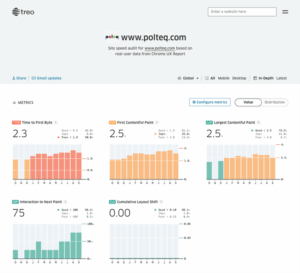
One tool that uses this CrUX data is Treo. Out of curiosity, I immediately analyzed Polteq’s website. This showed that the Time to First Byte (TTFB) is on the high side. Treo can help figure out the cause of this, though it requires a paid subscription.
TTFB is the time that elapses before the browser receives the first byte from the server. This time consists of:
– reaching the server,
– processing the request by the server,
– and sending the data back to the browser.
Thus, TTFB depends partly on Internet speed and partly on server processing. A low TTFB value indicates a faster and better performing server.
Speculation rules: performance thinking ahead
Another interesting session, provided by Google, dealt with so-called performance hints. These are relatively new browser functionalities that help improve client-side performance.
The oldest and best-known hint is loading=lazy. This can be added, for example, to a tag, which causes images to be loaded only when the user scrolls to them. Whereas this used to require JavaScript libraries, today most browsers support it natively.
A newer development are JavaScript speculation rules. These allow the browser to be given hints about which pages might be visited next. The browser can already download or even render these pages in the background. This fills the cache before the user actually navigates to the page, making the experience feel significantly faster.
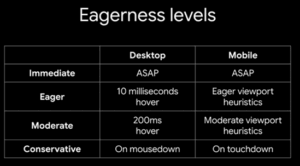
Web developers have several options here. Options can be chosen from:
– prefetch
– prerender until script (expected in early 2026)
– prerender
In addition, you can indicate when these actions occur:
– immediate
– eager
– moderate
– conservative
There are clear tradeoffs associated with these choices in terms of risk, performance gain and cost. Prerendering a shopping cart or logout page, for example, is not desirable. Moreover, prerendering creates additional load on the server, which incurs costs and risks.
Summary:
– Prefetch: low risk, limited performance gain, low cost
– Prerender: high risk, maximum performance gain, higher cost
When deployed intelligently, this technique can significantly improve the user experience. Unfortunately, the Speculation Rules API is not currently supported by Safari and Firefox. However, it is expected that these browsers will follow suit. So for now, users of Chrome, Edge and Opera will benefit the most from these improvements.
Rob Leijenaar Testexpert at Polteq